Wiring it all together: site, Printful, payment
Twelfth post in “Tools I build with.” A site that takes reservations, a Printful store with a real product, an API token with the right scopes, and three different fonts is not a pipeline. A pipeline is what happens when those four things route to each other reliably. This post is the wiring: how a buyer’s number turns into a Printful draft order, the real cost numbers that came out of testing it, and why the version that just shipped does not yet take a payment.
The pipeline at one glance
Six steps from form to draft, every one of them small.
- Buyer fills the reservation form on wearlunaire.com/reserve/: number, size, name, email, country.
- The browser POSTs the form to
/api/reserveon the same origin. - The backend (
maloudongelmans-contact, FastAPI, episode 11) renders#NNNserver-side as a PNG in the locked Concert One face from episode 10. - The PNG is hosted at a public URL on wearlunaire.com (so Printful can fetch it) and submitted to Printful’s file library via
POST /files. - Once Printful has processed the file, the backend creates a Printful order with
POST /orders, overriding the right-sleeve placement with the new file id and leaving the rest of the synced product’s placements (chest, neck label) alone. - The order lands in Printful’s dashboard as a draft. The founder reviews each draft, confirms it manually, and only then does printing and shipping start. No money has moved at this point. That changes when payment is wired (later in this post).
Each step in isolation is small. Most of the work is in connecting them, not in any one of them. The whole pipeline is around 200 lines of Python plus the existing infrastructure from earlier episodes.
Step 1: rendering the per-order PNG
The render script lives at /root/lunaire/render_number.py on the VPS. Pillow plus the Concert One TTF, hardcoded canvas dimensions and a single locked font size. The locked size is the design decision from episode 10 made concrete: every customer’s edition number stitches at the exact same scale.
FONT = '/root/lunaire/fonts/ConcertOne-Regular.ttf'
CANVAS = (600, 900)
FONT_SIZE = 215  # fits the worst-case 3-digit number (#002, widest with two zeros)

def render(n: int, out: Path) -> None:
    text = f'#{n:03d}'
    font = ImageFont.truetype(FONT, FONT_SIZE)
    img = Image.new('RGBA', CANVAS, (0, 0, 0, 0))
    draw = ImageDraw.Draw(img)
    bbox = draw.textbbox((0, 0), text, font=font)
    tw, th = bbox[2] - bbox[0], bbox[3] - bbox[1]
    x = (CANVAS[0] - tw) // 2 - bbox[0]
    y = (CANVAS[1] - th) // 2 - bbox[1]
    draw.text((x, y), text, font=font, fill=(0, 0, 0, 255))
    img.save(out, 'PNG')
The font size 215 came from a one-off measurement: at a reference size of 1000 points, Concert One renders #002 at 2229 pixels wide (the widest three-digit numeral because of the wide zeros). To fit that worst case in a 480-pixel target inside a 600-pixel canvas, the size scales down to 215. Every other number in 1 to 999 fits comfortably at the same size, which is the property the brand needs.
Output is a 600 by 900 transparent PNG with pure black text. Pure black, not a tinted dark grey, because Printful resolves the embroidery thread colour from a separate options field rather than from the file itself; the file is just shape information.
Step 2: uploading to Printful’s file library
The PNG gets dropped into a public path on wearlunaire.com (/img/lunaire/test/sleeve-NNN.png) so Printful can fetch it. The upload is one POST.
curl -X POST https://api.printful.com/files \
  -H "Authorization: Bearer $PRINTFUL_API_TOKEN" \
  -H "Content-Type: application/json" \
  -d '{
    "url": "https://wearlunaire.com/img/lunaire/test/sleeve-042.png",
    "type": "embroidery_wrist_right",
    "filename": "lunaire-sleeve-042.png"
  }'
Printful answers with a file id and a status of waiting. The file goes from waiting to ok within a few seconds for a small PNG (Printful is rasterising and analysing it). Polling the file’s GET endpoint until status is ok is the gate before the order can be created. Tries every couple of seconds, gives up after thirty.
Step 3: the per-order file override
This is the one mechanic the whole personalised-PoD model rests on. Printful’s order endpoint lets a single line item override one or more placements with custom files, while inheriting all other placements from the synced product. The chest LUNAIRE wordmark and the inside neck label do not need to be re-sent on every order. They live with the synced product. Only the sleeve number is per-order.
POST https://api.printful.com/orders
{
  "recipient": { ...buyer’s address... },
  "items": [{
    "sync_variant_id": 5280764286,
    "quantity": 1,
    "files": [
      { "type": "embroidery_wrist_right", "id": 979948533 }
    ],
    "options": [
      { "id": "thread_colors_wrist_right", "value": ["#000000"] }
    ]
  }]
}
Two things to know about this call.
First, the options array is required even when overriding only the file. The first time the test ran without it, Printful returned a 400 with the message thread_colors_wrist_right option is missing or incorrect. The fix is to re-declare the thread colour for the placement on every order. Lunaire’s placement is locked to #000000 (black), so this is a constant in the code, but it has to be sent.
Second, omitting confirm: true creates the order as a draft. The order lands in the Printful dashboard, ready to be reviewed, but does not print, does not ship, and does not charge. This is the approval-queue mechanic: the founder is the gatekeeper, manually clicking Confirm on each draft (or letting the system auto-confirm later, when volume justifies it).
The economics surprise
The first end-to-end test produced a real cost breakdown. Posting an estimate against sync_variant 5280764286 (size M) with a per-order sleeve override returned this for a Netherlands shipping address:
| Per order | |
|---|---|
| Wholesale subtotal (blank + chest + sleeve embroidery) | €29.50 |
| Digitisation | €5.75 |
| Shipping (NL standard) | €6.29 |
| VAT (NL, 21%) | €8.73 |
| Total wholesale to seller | €50.27 |
| Retail to buyer | €79.99 (+ shipping) |
| Gross margin per order | ~€29.72 before VAT, ~€38 with VAT recovery |
The line that matters is digitisation, €5.75 per order. Every order. Not amortised. Embroidery digitisation (turning an image into stitch paths) is normally a one-off charge per design; for a fixed catalogue, you pay it once and reuse it forever. Lunaire’s sleeve number is a different design on every order, so the fee fires every single time. Across a full 999-piece edition, that is roughly €5,743 of digitisation fees alone, which is the kind of number that quietly eats a margin if it is not priced in.
The honest answer is to bake it into the retail price, which is what episode 09’s €79.99 does. Episode 05b proposed €69 for the numbered crewneck, which was set before this fee was modelled per-order; €79.99 is the post-discovery number. Two other paths exist for later: ask Printful directly to waive or discount the fee on a committed run (their account managers sometimes do, especially for embroidery-heavy stores at volume), or move the personalisation off embroidery and onto a printed neck-label or hem-tag instead, where digitisation is not a thing. For a first edition, paying the fee and pricing it in is the cleanest move.
The #888 test as receipt
The test order is real. Order id 155943501 sits in the Printful dashboard as a draft, recipient marked LUNAIRE DRAFT TEST 888, sleeve overridden with file id 979948533 (a Concert One #888 rendered by the script above). The mockup Printful auto-generated for that draft shows the sleeve number stitched correctly above the right cuff, in tonal black on the actual blank.
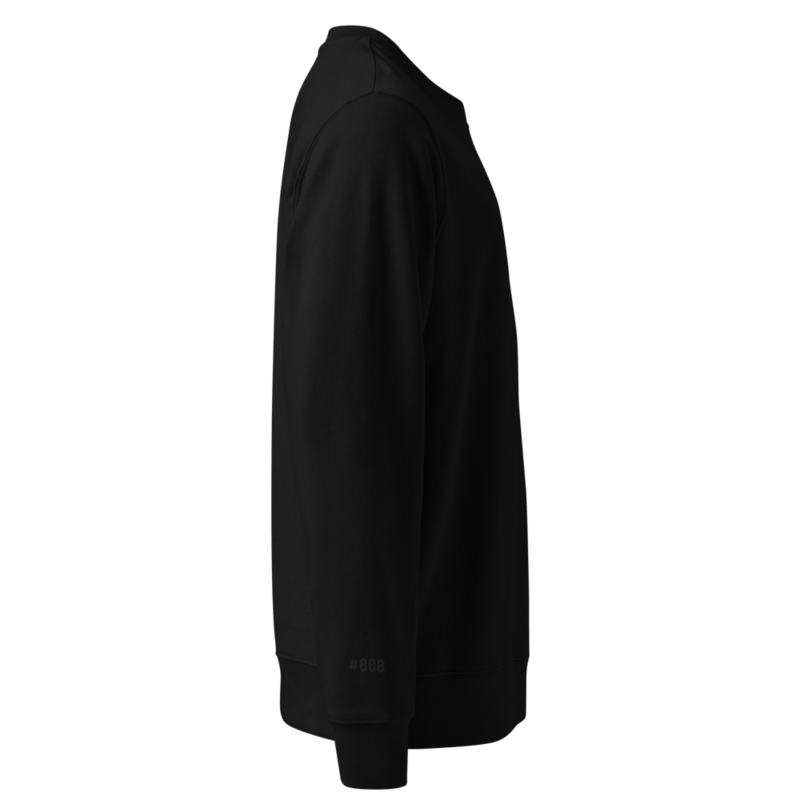
One UI detail worth knowing for anyone reviewing drafts later: the Printful dashboard’s Print files panel only shows the per-order overrides, not the inherited placements. The chest LUNAIRE wordmark does not appear in the file panel for this draft; it is inherited from the synced product. The cost line is the durable check: a wholesale subtotal of €29.50 matches the synced product’s full cost (chest + sleeve), so the chest is being stitched. If only the sleeve were stitched, the cost would be lower. The cost tells the truth that the UI hides.
Approval queue as v1, not workaround
Two patterns for a personalised order pipeline.
- Auto-confirm: the API call sends
confirm: trueon submission, the order goes straight to print, the buyer gets a sweatshirt in five working days, the seller looks at nothing. - Draft-by-default: the API call omits
confirm, the order sits in the Printful dashboard as a draft, the seller reviews each one before clicking Confirm, the buyer gets a sweatshirt in five working days plus the seller’s response time.
For Lunaire’s scale (low single-digit orders per day at launch, 999 ever, €43 of cost committed at confirmation), draft-by-default is the right v1. The cost of clicking Confirm is roughly thirty seconds. The cost of a wrong order printing (a typo in the address, a number collision, a bad render) is the €43 wholesale plus a refund and a replacement. Manual approval at this scale is not friction, it is quality control on a line that has not earned automation yet.
Switching to auto-confirm later is a one-line change. The current default is locked to drafts on purpose, and it is quietly on-brand: a 999-piece numbered edition is supposed to be considered. Each piece personally approved before stitching is luxury positioning for free.
Payment is deferred, on purpose
Stripe Checkout (or Mollie, depending on which fee structure wins for the EU buyer mix) is the next thing to wire, not the missing first thing. Three reasons it ships second rather than first.
- The unit-economics had to settle. The digitisation fee surprise above is the kind of finding that changes the retail price. Charging a card on day one and discovering the fee on day three would have meant either eating the difference or refunding orders to re-price. A waitlist with a manual reply is forgiving while the numbers settle.
- The form doubles as a signal. A waitlist that fills up shows real demand; a stripe Checkout that does not convert just looks broken. The information from the first hundred reservations is more useful than the first hundred sales.
- The build cost is a session, not a sprint. A Stripe Checkout integration on this stack is a few hours of work: a payment link or a hosted Checkout session, the webhook to confirm capture, the trigger to flip the Printful draft from draft to confirmed. Wiring it next session, after the journal entry, is a feature of the shipping order, not a delay.
The honest framing for the buyer is: reserve a number now, pay when it is ready to stitch. That is a softer ask than checkout-on-day-one, and it gives the seller information rather than just transactions in the early window.
What to be aware of
- The synced product is the floor; per-order overrides are the diff. Every order inherits every placement of the synced product unless explicitly overridden. Changing the chest design once changes it for every future order. Changing the sleeve number per order is the design pattern for personalisation. Mixing those two layers is what makes the model work.
- Thread colour is required on every override. The 400 error if you forget is misleading; the issue is not a missing scope, it is a missing options field on the line item. Send
thread_colors_<placement>alongside the file every time. - Drafts cost nothing, but addresses still validate. A draft requires a valid recipient address even though it does not ship; Printful runs the address through their validator at draft creation. For an internal test, use a known-real placeholder address (a city hall, the founder’s home, anything that geocodes) and delete the draft after.
- The dashboard hides inherited files. Useful to know before reviewing a queue of drafts: the “Print files” panel only renders per-order custom uploads, not what comes from the synced product. The reviewer-fatigue moment of where did the chest go? happens to everyone. The cost line is the durable check.
- Mockup contrast is artificial. Printful boosts contrast on tonal embroidery in the auto-mockup so the design is legible to the reviewer. The actual stitched garment is more subtle. This affects how marketing photography is briefed, not the design itself.
What’s next in the series
- Marketing without a budget. A 999-piece sweatshirt is launchable in days. Whether anyone buys one is a separate problem, and the hardest part of the whole journey.
Subscribe below for the next one.