Setting up Printful: store, product, API
Ninth post in “Tools I build with.” Up to here, Lunaire was a name, a font, a colour palette, and a price-point spreadsheet. None of that is a product. This post is the day Printful goes from a tab in the browser to a working store with a real product, a chest design, a sleeve design, and an API token good enough to receive orders from a custom site. Roughly four hours of work, no employees, no agency. The whole point of print-on-demand is that this part is fast.
Print-on-demand is the safest route, not the best
One thing to be honest about before any of this. Print-on-demand is the route a solo builder takes to be selling something within days rather than months. It is not the route that makes the best garment. A real production run with a small factory in Portugal or Tunisia gives a better blank, a better stitch, a better finishing pass, and a price that holds up against premium streetwear. It also costs four-figure minimums, six to twelve weeks of lead time, sample rounds, and the risk of holding inventory.
PoD trades all of that for a different deal: pay per piece, no inventory, ship from the printer, lose maybe twenty per cent of the finishing quality. For a first edition, for a brand testing whether anyone cares, for a journal documenting what one person can build solo, that trade is the right one. It is the safest route. Switch to a small factory once the buyers are real.
Picking the product
Lunaire’s concept (episodes 05b and 05c) lays out three pieces: a personalised hoodie generated from the buyer’s birth chart, a numbered crewneck sweatshirt, and a phone case with a colour picker. Day one of execution does not ship three pieces. Day one ships one piece, the simplest one, and learns from it. The numbered crewneck wins that decision: no birth-data generator to wire, no phone-model catalogue to maintain, just a fixed wordmark on the chest and a three-digit edition number on the sleeve. The shape of the product matches the shape of one launchable thing.
The blank is Stanley/Stella STSU178 (the Unisex Eco Changer 2.0 sweatshirt). Same family covered in episode 05b: GOTS-organic cotton, Fair Wear Foundation factory audits, mid-weight (around 350gsm), available in deep black with a clean cut. Embroidery-friendly fabric, which matters more than people expect: thin-knit synthetics pucker around dense stitches, eco cotton holds its shape. Five sizes (S, M, L, XL, 2XL), one colour. The colour restraint is part of the brand. Adding a heather-grey option is a future call, not a launch call.
What got rejected, briefly: the Bella+Canvas blends (cheaper per piece, but they read cheap on the body), the 500gsm heavyweight hoodies (better feel, but Printful’s catalogue is thin in that weight), and the all-cotton fleece options (good fabric, but the chest area is too soft for embroidery to sit cleanly). Stanley/Stella is the dependable middle.
Store types: why “Manual order / API platform”
Printful runs three store types and the wrong choice makes everything afterwards harder.
- Connected stores (Shopify, Etsy, WooCommerce, Wix). Printful syncs your products into the platform’s catalogue. Customer buys on the platform; the order forwards to Printful for fulfilment.
- Manual order / API platform. No connected platform. You either place orders by hand in the Printful dashboard, or your own custom site calls the Printful Orders API directly. This is the store type a solo-built custom site uses.
- Native Printful storefront. Printful hosts a basic storefront for you. Limited control, fastest path to selling if you have no site at all.
Lunaire needs the Manual order / API platform type. The reason is the same one episode 07 spends five hundred words on: per-order personalisation does not fit a connected-store model. Shopify expects fixed SKUs, one variant per size and colour. A 999-piece numbered edition is technically 999 SKUs, and a birth-chart hoodie is one SKU per buyer. The connected-store path collapses under either of those.
Setup takes about three minutes. Sign in, click Stores, click Add store, name it (here: LUNAIRE), pick the API-platform type, accept the manual-order terms. Printful issues a numeric store ID (here: 18070179) which appears in every API call from that point on.
One trap worth flagging. A Printful account can hold multiple stores. An API token is scoped to one store, not the whole account. The first token I generated was tied to an old Shopify test store from a previous experiment, not the new LUNAIRE store, and it took half an hour of confused 403 responses to spot. The fix: generate the token from inside the LUNAIRE store’s settings, not from the account-level developer page. Read the URL bar before clicking generate.
Designing the product in the Design Maker
Printful’s Design Maker is a browser tool that maps files onto a 3D mockup of the blank. Three placements get used for the Lunaire crewneck.
- Chest, centre. The LUNAIRE wordmark in Heavitas (the typeface from episode 08), embroidered tonal black on black. The file comes from the brand pack:
embroidery-wordmark-4096.png, a wide-aspect transparent PNG with pure black as the stitch path. - Right sleeve, wrist. A three-digit edition number prefixed with
#, embroidered in the same black thread. At launch this is a placeholder#001, set as a text element in the Design Maker rather than an image. The per-order override mechanic that swaps in the buyer’s actual number lands in episode 12. - Inside neck label. A small wordmark plus size and care, printed not embroidered. Only visible when the wearer flips the neck.
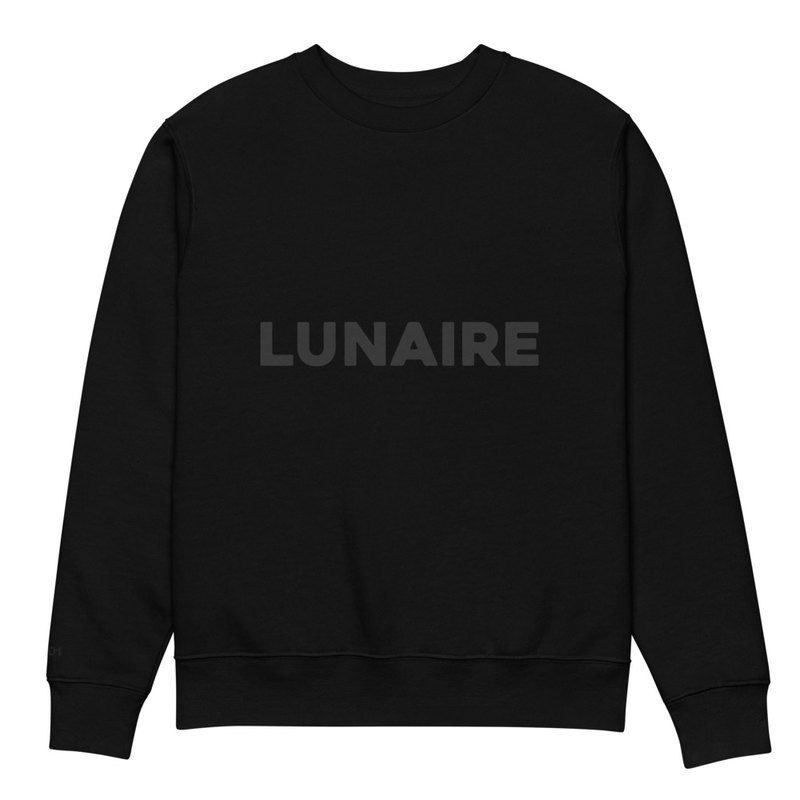
Three placements, not five. Each extra placement adds production cost and dilutes the tonal-on-tonal restraint that is half the brand. A back print would shout where the brand is trying to whisper. Hold the line.
The retail price set in the Design Maker is €79.99. Episode 05b proposed €69 for the numbered crewneck, but that was before the Printful digitisation fee was priced per-order rather than per-design. Reconciled in episode 12 with real numbers: roughly €43 wholesale per piece on a custom-numbered order, plus the margin model from episode 08. €79.99 is the honest number.
Where the print files actually live
Two layers worth understanding for anyone building on top of Printful.
The first layer is the file library. Every file you upload (image, PNG, embroidery source) sits in a global library, indexed by a numeric file id. Files have a processing status (waiting, then ok once Printful has rasterised and analysed them) and live preview URLs. Files can be reused across products and across orders. Uploading the LUNAIRE wordmark once means every variant of every product in this store can reference the same file id.
The second layer is the product placement assignment. Each sync variant (here: one per size) holds a small array of files, one per placement. The Lunaire crewneck’s S/M/L/XL/2XL all share the same chest file id and the same wrist file id. Same artwork across sizes; the printer scales the file to fit the placement area for each size.
This two-layer split matters for personalisation. A per-order override (covered in episode 12) does not modify the synced product. It uploads a new file to the library, then submits an order that points at the new file id for one placement, leaving the others to inherit from the synced product. The synced product stays clean. Every order is its own isolated record.
The API token
One Printful store, one API token. Generated in Settings → Stores → LUNAIRE → API tokens. The scopes that matter for a custom-site setup are:
orders. Read and write orders; the line item that lets a /api/reserve route create a draft order.sync_products. Read products and their variants; needed to look up the right sync_variant_id at order time.file_library. Upload new files from URLs and check their processing status.webhooks. Register endpoints to receive order status updates (shipped, delivered, returned).
The token lives at /root/lunaire/.env on the VPS, in a file with mode 600 and never committed to git. Three variables make up the contract:
PRINTFUL_API_TOKEN=...
PRINTFUL_STORE_ID=18070179
PRINTFUL_STORE_NAME=LUNAIRE
One sanity-check curl confirms the token works before any code touches it:
curl -H "Authorization: Bearer $PRINTFUL_API_TOKEN" \
  https://api.printful.com/store/products
If that returns the live product, the token has the right scope. If it returns 403, regenerate from inside the right store.
Standard hygiene: rotate the token a week or two after the launch is stable. The first token gets typed into a few places (terminal scrollback, the .env file, possibly a chat) during setup, and rotating it once cleanly is good defence. The old token can be revoked from the same page that issued it.
What to be aware of
- Digitisation is per design, every order. Embroidery digitisation (turning an image into stitch paths) is roughly €5.75 per design at Printful in 2026. For a fixed catalogue this is a one-off. For a numbered edition where every order has a unique sleeve number, the fee fires every single order. Bake it into the price; do not absorb it. The full unit-economics walk is in episode 12.
- API tokens are store-scoped, not account-scoped. A token generated in store A does not see store B, even on the same Printful account. The error message (“requires
stores_list/readscope”) misleads you into thinking the token is missing a scope; the actual issue is that the token belongs to a different store than the one you are calling against. - The retail price field is metadata for API-platform stores. Connected-store types display the retail price to customers. API-platform stores do not show anything to anyone; the customer-facing price lives on your custom site. The Printful field is purely for your own bookkeeping. Keep it accurate so the dashboard tells the truth, but it is not load-bearing.
- Switching the blank later is expensive. Every placement file is sized to a specific blank’s print area. Switching from STSU178 to a different sweatshirt means redesigning each placement, re-digitising each embroidery, and possibly re-photographing the brand assets. Pick the blank carefully on day one rather than expecting to reverse the choice cheaply.
- Stock is shared with every other Printful customer. Stanley/Stella stock is shared across Printful’s entire customer base. A blank that sells well across the platform can briefly go out of stock during a launch, even if your edition is small. The fix is to keep an alternate blank in mind (here, the close-cousin STSU170) so a stockout does not pause the whole shop.
What’s next in the series
- The artistic direction for the sweatshirt. Why tonal black on black, why two different fonts on the same garment, and why the sleeve number is the personalisation rather than the chest.
- Building wearlunaire.com. The site, on top of the existing nginx container.
- Wiring the pipeline end-to-end. The reservation form, the per-order file override, the draft-order approval queue.
- Marketing without a budget. The hard part.
Subscribe below for the next one.